A declined card at checkout is usually a lost sale. In Baymard Institute's 2022 survey of 4,384 US adults, 10% of shoppers who abandoned a checkout said their card was declined (Baymard Institute, retrieved 2026-11-08). Few come back. In a Checkout.com survey with Oxford Economics, 45% of consumers said they would not retry after a false decline (Checkout.com, 2023, sample size not published).
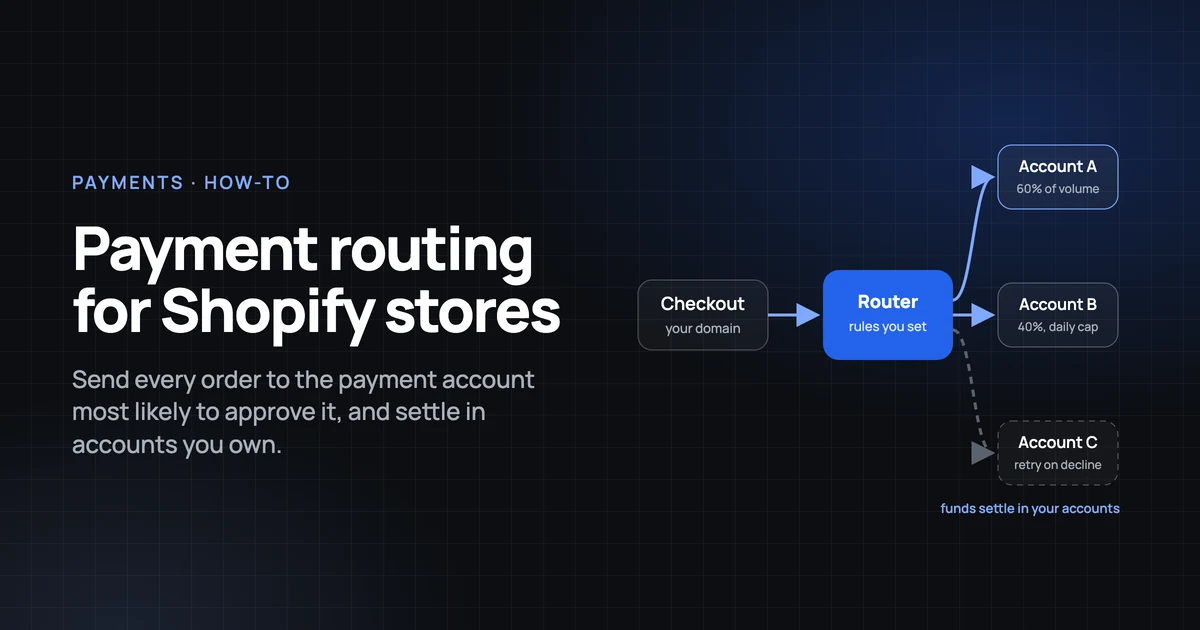
Payment routing is the set of rules that decides which of your payment accounts attempts each order, and where it goes if that attempt fails. Shopify adds one constraint to design around: only one credit card payment provider can be active at a time (Shopify Help, retrieved 2026-11-08).
This guide covers what Shopify allows, how to write routing rules inside those limits, retries that respect strong customer authentication (SCA), and one ledger for every account. It is for founders and operations leads who already hold two or more payment accounts, and the developers who help them. For the platform picture first, see how Shopify and WooCommerce stores connect to a routing layer.
Key Takeaways
- Shopify allows one credit card payment provider at a time (Shopify Help, retrieved 2026-11-08). Splits, caps and fallbacks across acquirers must live inside that provider or inside a routing layer in its place.
- Native Payment Customizations hide, rename and reorder payment methods; they do not choose an acquirer or retry a decline (shopify.dev, API version 2026-10).
- Retry soft declines only, and stay within the 4 to 6 retries in 15 days that many card networks allow (Stripe, undated guide).
- Shopify's third-party transaction fee runs from 2% on Basic to 0.2% on Plus (Shopify pricing, retrieved 2026-11-08) and applies even when Shopify Payments is active (Shopify Help, retrieved 2026-11-08).
- A routing layer should never hold your money. Each provider pays out to your own bank account, and one ledger reconciles them.
What payment routing means on a Shopify store
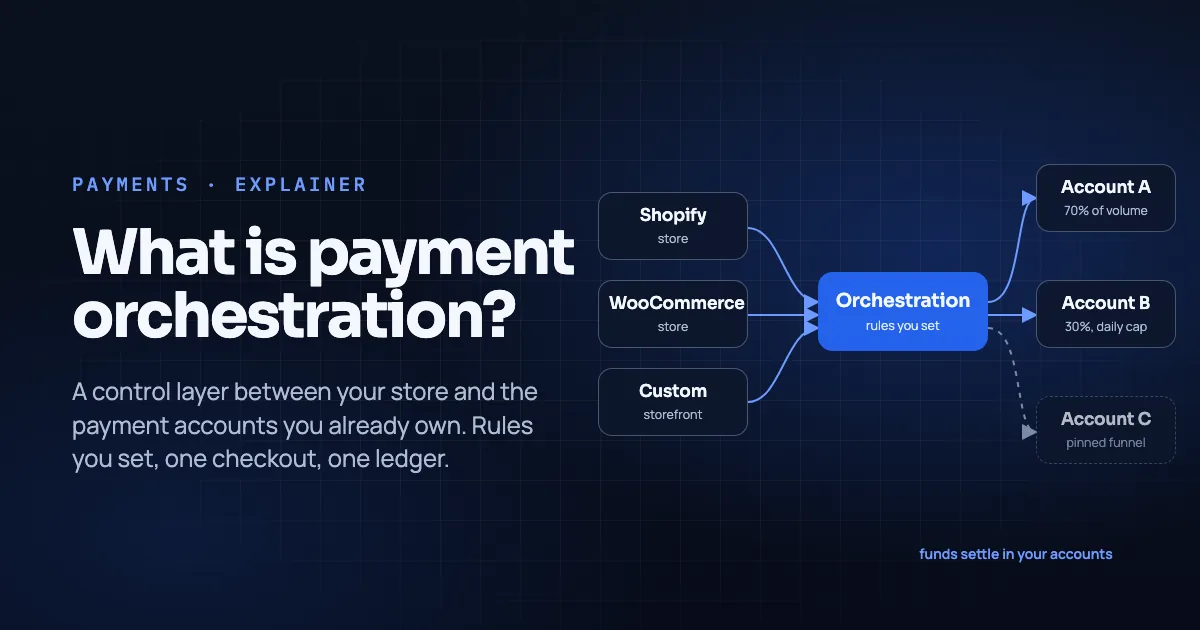
Payment routing decides which payment account attempts each order and what happens when that attempt is declined. A payment service provider (PSP) such as Stripe or PayPal authorizes the card and settles the money. Routing sits one level above and chooses between the PSPs and acquirers you already hold, order by order. An acquirer is the bank or processor that accepts card payments on your behalf. To see where a payment gateway fits, read our guide to the payment gateway vs PSP vs orchestration layer.
On Shopify, routing happens in one of two places. Either inside one direct provider with its own routing and retry logic, or inside a routing layer, also called an orchestration layer, that connects several acquirers behind one integration. Both fill the same slot, because only one credit card payment provider can be active at a time (Shopify Help, retrieved 2026-11-08).
Whichever layer routes the payment, each provider pays out to the bank account you own.
Declines are a small slice of checkout abandonment, but they are the slice routing can reach. Extra costs and trust worries rank higher in Baymard's survey, so fix those too.
Before you begin
Gather the access, data and account list below before you change any setting.
- Store owner access. Only the store owner can change payment providers (Shopify Help, retrieved 2026-11-08).
- Exports of declines and payouts from each provider for the same recent period; 90 days is a practical window.
- A list of the payment accounts you already own, with the countries and currencies each one can acquire.
- Your Shopify plan tier, because the third-party transaction fee depends on it.
- The markets and currencies you sell in, and where most declines come from.
- Time: about 2 to 3 hours of setup, then two weeks of observation.
- Difficulty: intermediate. You should be comfortable reading decline codes and payout reports.
If an agency manages your store, involve them before Step 2, since a provider change touches refunds and tax settings. See how agencies and platforms work with a routing layer. If you are that agency, follow our step-by-step playbook for migrating a Shopify store to payment orchestration.
Step 1: Audit your declines and your fees
By the end of this step you will know your authorization rate per provider, the decline codes behind it, and your fee per order. Routing rules are only as good as this baseline.
Most declines come from the cardholder's bank, and generic codes hide the reason (Stripe, undated guide; Airwallex, 2026-01-05). Stripe's guide names "05 Do not honor" as the most common decline code. The same guide notes that online authorization rates can run about 10% lower than in-person. A false decline refuses a legitimate customer. False declines averaged 1.51% of ecommerce sales among 200 US and UK merchants interviewed in 2023 (Datos Insights, published 2024-05-23).
- Export every transaction attempt from each provider for the same period, with decline code, issuer country, currency and amount.
- Compute the authorization rate per provider: approved attempts divided by total attempts, with first attempts and retries separated.
- Group declines by code. Separate soft declines (insufficient funds, do not honor, issuer unavailable) from hard declines (lost or stolen card, closed account, invalid number).
- Add the fee per order: the provider's processing fee plus Shopify's third-party transaction fee for your plan. Shopify charges that fee on orders that do not run through Shopify Payments: Basic 2%, Grow 1%, Advanced 0.6%, Plus 0.2% (Shopify pricing, retrieved 2026-11-08).
- If you are evaluating a routing layer, add its per-transaction fee to the same row. See what a routing layer costs per transaction.
Verification: one table with a row per provider showing authorization rate, the top five decline codes and total fee per order.
Step 2: Choose a provider setup that Shopify allows
This step ends with a provider configuration that Shopify accepts and that leaves room for routing.
Shopify allows one credit card payment provider at a time (Shopify Help, retrieved 2026-11-08). Shopify staff describe the full set as that provider plus PayPal, one alternative provider and manual payment methods, and merchants asking for redundancy or per-region routing got no native answer (Shopify Community, staff replies 2018 to 2025). Shopify Payments can also run alongside a direct third-party provider, to offer Shop Pay and local payment methods and to recover failed transactions (Shopify Help, retrieved 2026-11-08).
Fees follow the provider. The third-party transaction fee from Step 1 applies to orders through third-party and alternative providers even when Shopify Payments is active (Shopify Help, retrieved 2026-11-08). It never applies to Shopify Payments, Shop Pay, Shop Pay Installments or manual methods, and PayPal is exempt when Shopify Payments is primary.
Direct providers complete the purchase on your online store; external providers send the shopper to a page hosted outside it (Shopify Help, retrieved 2026-11-08).
- Decide what fills the single credit card slot. Either one direct provider with built-in routing, or a routing layer connected as a direct provider with several acquirers behind it.
- Decide whether Shopify Payments stays active alongside it. Selling in multiple currencies requires it (Shopify Help, retrieved 2026-11-08). It is available in 41 countries and regions (Shopify Help, retrieved 2026-11-08).
- For a US store on Shopify-managed sales tax, set tax to self-directed first. Third-party providers are unavailable until you do (Shopify Help, retrieved 2026-11-08).
- In Settings > Payments, save the current provider's credentials before switching. You need them to process returns for orders captured under the old provider (Shopify Help, retrieved 2026-11-08).
- Activate the new credit card provider as the store owner.
Shopify will not split card volume across two providers, so splits, caps and fallbacks live inside whatever fills that single slot. Step 3 covers them.
Verification: Settings > Payments shows one credit card provider, plus Shopify Payments, PayPal and manual methods if you kept them. A test order completes under the new provider.
Step 3: Write your routing rules
By the end of this step you will have two layers of rules. Shopify rules shape which payment methods a shopper sees; provider-level rules decide which account processes the card.
Layer A: native Payment Customizations
Shopify Functions let you hide, rename and reorder payment methods at checkout (shopify.dev, Payment Customization Function API, version 2026-10). Inputs include cart cost, buyer identity (customer tags, amount spent, order count), delivery groups, payment method names and presentment currency (the currency the shopper sees at checkout). A store can run at most 25 active customizations, in Checkout and B2B only, not POS. Placement-level hiding and payment terms are Plus-only.
Logo-based wallets such as Shop Pay, Apple Pay and Google Pay cannot be renamed. Express wallets can be removed but not reordered (shopify.dev, checkout payments tutorial). No Payment Customization chooses which acquirer processes a card or retries a decline. That is Layer B.
Layer B: provider or routing-layer rules
These live in the dashboard of whatever fills your credit card slot. Four rule types cover most needs:
- A percentage split across accounts
- A daily cap per account, in amount or order count
- A pin that sends a market, currency or funnel to one account
- A fallback account for soft declines
- Write Layer A first. Build or install a Payment Customization for the cases that matter, such as moving a local method first for a presentment currency. Stay under 25.
- In the provider or routing-layer dashboard, write Layer B rules in evaluation order: pins, split, caps, fallback.
- Name each rule after its business reason and record the set, with its go-live date, in a shared document.
A hypothetical example
You hold Account A, a US-acquiring account, and Account B, an EU-acquiring account with a local acquirer. Your rules, in evaluation order:
- Orders in EUR or shipping to an EU address go to Account B.
- All other orders split 60% to Account A and 40% to Account B.
- Account B accepts at most 20,000 EUR per day. Once the cap is reached, orders that would go to B go to A until midnight.
- If the chosen account returns a soft decline, retry once on the other account. Hard declines are never retried.
An order for 180 EUR, shipping to Lyon, arrives at 16:40. Rule 1 sends it to Account B. Account B has processed 14,200 EUR today, under the cap, so rule 3 does not fire. Account B's acquirer returns "05 Do not honor", a soft decline. Rule 4 sends one retry to Account A, which approves. The order is captured on Account A and settles into the bank account linked to Account A, on that provider's payout schedule. Step 4 covers what that retry must do about SCA.
The example shows mechanics only; it does not predict an authorization rate.
Verification: place one order per rule path: an EU order, a non-EU order, and a simulated soft decline if your layer supports it. Confirm each lands in the expected account.
Step 4: Add retries without breaking SCA
After this step, your retries target soft declines only, stay within network limits, and never force a shopper through a second authentication.
Network limits, retries and tokens
Many card networks allow only 4 to 6 retries in 15 days on a declined card (Stripe, undated guide). Stripe reports that its real-time retries recover 20% of false declines on average (Stripe, vendor figure, no methodology published). Treat it as a vendor figure, not a benchmark for your store.
Network tokens replace the card number with an issuer-backed token, and several sources report an authorization lift. The figures are not comparable with each other: definitions mix percent and percentage points, first attempt versus all attempts, and regions.
| Source | Scope | Reported change |
|---|---|---|
| Visa | Global card-not-present, 2025 | +4.8% authorization rate |
| Mastercard (via PYMNTS) | Earnings call, March 2024 | +3 to 6 percentage points approval |
| Adyen | Customers using tokens, 2023 | +3% average |
| Checkout.com | Most merchants, 2023 | +2 to 3% |
SCA exemptions in the EU and UK
In the EU, Commission Delegated Regulation (EU) 2018/389 has governed strong customer authentication since 14 September 2019 (EUR-Lex). Three exemptions matter for retries.
| Article | Exemption | Threshold for remote card payments |
|---|---|---|
| Art. 16 | Low-value payment | Up to 30 EUR, and at most 100 EUR or five transactions since the last authentication |
| Art. 18 | Transaction risk analysis | Up to 100 EUR at a provider fraud rate of 0.13%, 250 EUR at 0.06%, 500 EUR at 0.01% |
| Art. 14 | Recurring transactions | Same amount to the same payee, once SCA was applied to the first payment |
Merchant-initiated transactions on a mandate set up with SCA are generally treated as out of scope; confirm this with your provider. In the UK, the FCA set the final ecommerce SCA deadline at 14 March 2022 (FCA, statement of 2021-05-20).
A retry must not re-trigger a challenge the shopper already passed. How a second account treats the 3-D Secure result (the card networks' authentication step) from the first attempt depends on your provider. Ask whether it reuses the authentication, requests an exemption or starts a new challenge, then test it.
Retry rules to write
- Define the soft-decline codes that qualify for a retry, such as do not honor, insufficient funds and issuer unavailable. Exclude every hard decline.
- Allow at most one real-time retry per order on a different account, and cap retries per card well inside the network limit.
- Enable network tokens where your provider supports them.
- For EU and UK shoppers, map each retry path to its SCA handling and get your provider's confirmation in writing.
- Log every retry with the original decline code, the account used and the result.
Verification: the retry log shows retries only on soft codes and never above your cap, and EU test orders completed one authentication, not two.
This section describes the regulation as published and is not legal advice.
Step 5: Keep the checkout on your brand and inside Shopify's terms
By the end of this step your routing setup keeps shoppers on your domain and stays within Shopify's checkout rules.
Shopify's Terms of Service, updated 2026-10-20, require Shopify Checkout for your store and for any sales associated with your online store (sections 2.1 and 4). Processing orders outside Shopify's Checkout is listed among the prohibited ways to circumvent the service (section 1). Checkout Extensibility has its own terms (section 9.13), and transaction fees are charged on top of the subscription (section 5) (Shopify Terms of Service, updated 2026-10-20, retrieved 2026-11-08).
Direct providers complete the payment on your store; external providers redirect to a page hosted elsewhere (Shopify Help, retrieved 2026-11-08). In Baymard's 2022 survey, 19% of shoppers who abandoned a checkout did not trust the site with their card information (Baymard Institute, retrieved 2026-11-08). A card form on an unfamiliar domain feeds that worry.
- Choose a direct integration for the credit card slot, so the card form stays on your domain with your published design.
- Keep Shopify Checkout as the checkout. Do not route online store orders through a payment page that replaces it.
- If you use Checkout Extensibility apps or Functions, stay within what section 9.13 permits.
- Re-read the current terms before you switch providers. They changed on 2026-10-20 and can change again.
- Confirm how card data is captured: through the provider's PCI-compliant fields, never stored by your store. See how card data is handled in a hosted checkout.
Verification: a test order stays on your domain from cart to confirmation, apart from 3-D Secure or wallet steps the issuer controls.
This is a reading of the published terms, not legal advice.
Step 6: Reconcile every account in one ledger
When this step is done, every payout from every account lands in one ledger, and you track four metrics weekly.
Each provider pays out on its own schedule to the bank account you linked. For Shopify Payments, the admin offers payout and balance reports (Shopify Help, retrieved 2026-11-08). Edgar Dunn's write-up of the European Payment Leaders Summit noted that centralized reporting is the most compelling orchestration benefit for merchants already on several PSPs. It also noted that routing engines remain largely rule-based (Edgar Dunn, 2025-10-01).
Two Shopify Payments fees affect cross-border reconciliation. The currency conversion fee is 1.5% for US stores and 2% in all other Shopify Payments regions. It is not returned on refunds (Shopify Help, retrieved 2026-11-08).
Payouts in multiple currencies need Advanced or Plus and one bank account per payout currency. Non-domestic payout fees are 1.5% on Advanced and 1% on Plus globally, or 1% and 0.75% for US stores. Adding a bank account pauses payouts for 3 to 5 business days (Shopify Help, retrieved 2026-11-08).
The routing layer itself should never hold your funds. Each provider settles directly to your own bank accounts; if money passes through the routing vendor, you have added a custodian and a settlement risk.
- List each account's payout schedule, currency and bank account.
- Pull payout reports from each provider weekly, including the Shopify Payments payout and balance reports.
- Match each payout to its orders by provider reference, then to the Shopify order ID.
- Track four metrics per account every week: authorization rate, decline-code mix, retry recovery (retries approved divided by retries attempted) and fee per order.
- Log conversion fees and non-domestic payout fees as separate lines so refunds reconcile correctly.
Verification: every payout on your bank statements matches one payout report and one set of orders, with no unexplained difference.
Common mistakes to avoid
The costliest mistake is a provider switch that leaves old orders with no refund path.
Switching card provider without keeping the old credentials
Refunds for orders captured under the previous provider still run through that provider. Merchants delete the old account to tidy up, then cannot process a return. Shopify's documentation says to keep the previous provider's credentials (Shopify Help, retrieved 2026-11-08). Keep them until the return window on the last old order has closed. Our chargebacks vs refunds guide covers what happens to the funds in each case.
Retrying hard declines
A stolen card or a closed account will not approve on a second acquirer. Retrying it uses one of the 4 to 6 attempts many networks allow in 15 days (Stripe, undated guide). Retry only soft codes, and keep the list short.
Expecting splits and caps natively in Shopify
Shopify runs one credit card provider at a time, and Payment Customizations only hide, rename and reorder methods. Merchants wait for a native split that does not exist. Put splits, caps and fallbacks inside the provider or routing layer that fills the slot.
Leaving third-party fees out of the routing math
Shopify's third-party transaction fee applies to every order that runs through another provider, even with Shopify Payments active. A rule that sends 40% of volume to a third-party account adds 0.2% to 2% on that volume, depending on your plan. Include it in the Step 1 fee per order.
Sending shoppers to an off-domain checkout
External providers redirect the shopper to a page hosted outside your store, with none of your brand. Replacing Shopify Checkout with your own payment page goes further and counts as circumvention under the terms. Pick a direct integration and keep Shopify Checkout.
What success looks like
If everything went correctly, after two weeks you can answer five questions from your own data, without asking a provider.
- Authorization rate per account, split into first attempts and retries, sits on a weekly chart.
- Retry recovery is measured, and the log shows no hard-decline retries and no card above your retry cap.
- Fee per order per account includes the processor fee and Shopify's third-party fee for your plan.
- Every payout from every account matches a payout report and a set of orders.
- EU test orders complete one authentication, and every checkout stays on your domain.
A stretch goal: review your split and cap thresholds monthly against the authorization data, and date every change so you can tell a real effect from noise. Before peak season, run the same numbers through our multi-acquirer peak-season payments checklist.
Frequently asked questions
Can I run two credit card gateways on Shopify?
No. Shopify allows one credit card payment provider at a time (Shopify Help, retrieved 2026-11-08). PayPal, one alternative provider and manual payment methods can sit alongside it (Shopify Community, staff replies). Routing across several acquirers therefore happens inside whatever fills that single slot.
Can Shopify Payments run alongside another provider?
Yes. A merchant using a direct third-party provider can keep Shopify Payments active to offer Shop Pay and local payment methods and to recover failed transactions (Shopify Help, retrieved 2026-11-08). Third-party transaction fees still apply to the orders that run through the other provider.
Will routing raise my authorization rate?
Nobody can promise that for your store. Vendors report gains from retries and network tokens. Stripe cites a 20% average recovery of false declines (Stripe, vendor figure); Visa reports +4.8% authorization for tokenized card-not-present transactions in 2025 (Visa). Those are their populations, not yours. Measure your baseline in Step 1 and compare after two weeks.
Does a routing or orchestration layer hold my money?
It should not. Each connected provider authorizes, captures and pays out to the bank account you linked to it. The routing layer only decides which provider handles each attempt. If a vendor settles funds to you from its own account, you are using a PSP with custody of your money.
Do I need to worry about SCA when retrying in Europe?
Yes. Regulation 2018/389 requires strong customer authentication on most remote card payments in the EU, with exemptions for low-value payments, transaction risk analysis and recurring transactions (EUR-Lex). The UK has applied SCA to ecommerce since 14 March 2022 (FCA). A retry must not force a shopper through a second challenge, so confirm how your provider handles the first authentication result. This is not legal advice.
Conclusion
Payment routing on Shopify works within one firm limit: a single credit card provider slot. Fill it with a provider or routing layer that connects the accounts you already own. The rest is discipline. You need an honest baseline, rules you can explain, retries that respect network limits and SCA, a checkout on your domain, and one ledger.
Start with Step 1 this week. The decline export and fee table take an afternoon and tell you whether routing is worth the rest. When you are ready to see rules run on a live store, book a 30-minute walkthrough of routing rules on a real store.
About the author. Mattieux Rinot is an SEO Expert at Temble, a payment orchestration layer that routes payments across a merchant's own accounts and never holds the funds. Mattieux has five years of experience across CRM, customer success and payment processing.
Corrections. If you find an error in this guide, tell us through the contact page. We fix it and add a dated update note.
Sources
- Shopify Help: Configuring third-party payment providers, retrieved 2026-11-08
- Shopify Help: Third-party payment providers, retrieved 2026-11-08
- Shopify Help: Shopify Payments, retrieved 2026-11-08
- Shopify Help: Selling in multiple currencies, retrieved 2026-11-08
- Shopify Help: Fees for international pricing, retrieved 2026-11-08
- Shopify Help: Payouts in multiple currencies, retrieved 2026-11-08
- Shopify Help: Shopify Payments supported countries, retrieved 2026-11-08
- Shopify pricing, retrieved 2026-11-08
- Shopify Terms of Service, updated 2026-10-20
- shopify.dev: Payment Customization Function API, version 2026-10
- shopify.dev: Checkout payments tutorial, retrieved 2026-11-08
- Shopify Community: How to add multiple payment gateways on Shopify, thread with staff replies, 2018 to 2025
- EUR-Lex: Commission Delegated Regulation (EU) 2018/389, applies since 2019-09-14
- FCA: Deadline extension for strong customer authentication, 2021-05-20
- Visa: Tokenization, VisaNet data, January to December 2025
- PYMNTS: Tokenized credentials gain momentum, 2024-03-11
- Adyen: Over two billion active network tokens, 2023-09-12
- Checkout.com: Network tokens, 2023-10-03
- Stripe: Optimizing authorization rates, undated, retrieved 2026-11-08
- Stripe: Authorization Boost, vendor page, retrieved 2026-11-08
- Baymard Institute: Cart abandonment rate statistics, retrieved 2026-11-08
- Datos Insights: E-Commerce Fraud Landscape and Trends, 2024-05-23
- Airwallex: Optimizing payment success rates, 2026-01-05
- Edgar Dunn: Payment orchestration, still the holy grail for merchants?, 2025-10-01